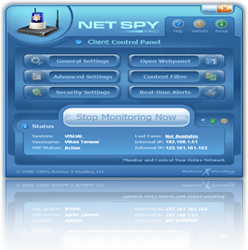
The Network Monitoring section has two different type of features. The first type is that of Live Monitoring. Certain functions can be performed live to instantly "check-up" on a user. The second type of monitoring is Logged Monitoring which captures specific activity and stores it for later viewing.
Live Monitoring
Net Spy Pro allows you to check-in one, some or all users at once. This shows you whether they are doing what they are supposed to be doing. You can also watch keystrokes as they happen! These features allow you to effectively watch all users' actions in real time.
See below for a complete list of Net Spy Pro live monitoring functions:
View Real Time Screens, Events and Keystrokes!
Net Spy Pro allows the administrator to view an actual screenshot of one, some or all workstations instantly! You can even watch keystrokes and events as they happen! This is used for live surveillance to see if your network users are working or playing.
View Browser Favorites
Net Spy Pro allows the administrator to view an actual screenshot of one, some or all workstations instantly! You can even watch keystrokes and events as they happen! This is used for live surveillance to see if your network users are working or playing.
View Temporary Histories
Net Spy Pro allows the administrator to view an actual screenshot of one, some or all workstations instantly! You can even watch keystrokes and events as they happen! This is used for live surveillance to see if your network users are working or playing.
View Open Ports
Net Spy Pro allows the administrator to view an actual screenshot of one, some or all workstations instantly! You can even watch keystrokes and events as they happen! This is used for live surveillance to see if your network users are working or playing.
View Active Processes, Services and System Info
Net Spy Pro allows the administrator to view an actual screenshot of one, some or all workstations instantly! You can even watch keystrokes and events as they happen! This is used for live surveillance to see if your network users are working or playing.
View Recent Documents
Net Spy Pro allows the administrator to view an actual screenshot of one, some or all workstations instantly! You can even watch keystrokes and events as they happen! This is used for live surveillance to see if your network users are working or playing.
Logged Monitoring
After installing Net Spy Pro onto a network, it immediately begins to record all activity on client PCs. Activity such as emails, web sites, chat conversations and much more is captured including screenshots. Net Spy Pro secretly records the activity for later viewing by the administrator.
When you need to view the activity of a client PC, just login to your all-in-one hidden control panel. This control panel allows you to view all of the activity logs recorded for any PC by date and time. Logs can be exported for storage and are standard JPG images and text files. Logs can easily be printed from within the interface.
See below for a complete list of Net Spy Pro live monitoring functions:
Web Sites Visited
Net Spy Pro creates a list of web sites visited in Internet Explorer, Mozilla Firefox and other popular browsers. Each URL visited will be logged, along with the username, timestamp and the title of the page visited. URLs can be launched from within the viewer.
Chat / IM Conversations
Net Spy Pro records entire chat conversations in popular instant messaging software including Yahoo! Instant Messenger, MSN Messenger, MSN Messenger, Paltalk, AIM and more. Records an actual text file of the entire chat conversation as it took place.
Keystrokes Typed
Net Spy Pro records all keystrokes typed by all users when they are logged in. This includes usernames, passwords and more. Also useful for recovering what a user has typed inside applications and for backup purposes in case of lost data.
Applications Executed
Net Spy Pro creates a list of applications that a user has executed and categorizes the results by date for easy navigation. Each application will be logged along with username, date and time executed, and the title of the application ran.
Documents Recording
Net Spy Pro will display a separate list of documents opened by the user. This feature is XP/NT/Vista compatible and stores the FULL PATH of each document executed along with the username and a timestamp. Compatible with MS-Office files, text files and more.
Emails Typed or Viewed
Net Spy Pro will record screenshots of all emails viewed or sent. Compatible with all email clients and web-based email services such as Yahoo! or Hotmail. Screenshots are recorded at any interval you set and gives you an actual picture of the email.
Windows Opened
Net Spy Pro creates a list of windows that were opened on the monitored computer. This feature stores the title of the window along with the username and timestamp. Also includes the ability to display records from a specific date all at once.
Screenshots Capturing
Net Spy Pro captures full-size screenshots of the entire screen at any interval you set. That's right, you will have a picture of the entire screen however often you choose. This captures a picture of absolutely ANY activity displayed on the screen.
Nearly all network administrators could save a lot of time using a utility that can perform vital PC functions quickly. For example, let's say a network administrator needs to reboot a PC. Usually you would need to physically walk to the PC to reboot it. With Net Spy Pro you can reboot a remote PC and perform numerous other important tasks all from your own PC workstation.
Administrative Tools
The intuitive interface allows you to perform vital tasks from the comfort of your own PC. These Administrative Tools give you the ability to lock a system, send the user a message, launch a web site, reboot the PC, logoff the user and much more.
See below for a complete list of Net Spy Pro logged monitoring functions:
System Lockdown
Net Spy Pro can lock a system from being used and unlock it on command.
Freeze Mouse
Net Spy Pro can freeze a user's mouse, then unfreeze it on command.
Restart PC
Net Spy Pro can restart any PC on the network through it's user interface.
Launch Web Site
Net Spy Pro can launch any application and navigate through the PC's file structure.
Run Screen Saver
Net Spy Pro can activate the screensaver of any remote PC with just one click.
Hide Windows Taskbar
Net Spy Pro can hide or show the Windows Taskbar on a remote PC.
Empty Recycle Bin
Net Spy Pro can empty the contents of the Windows Recycle Bin on any network PC.
Display a Message to User
Net Spy Pro can show a user any message you type without giving away stealth.
There's no doubt you will find something your users are doing that you don't approve of. After you which programs or web sites are causing distraction, you can block them. Content Filtering allows you to block a user from running web sites or applications easily using a set of criteria you create.
Content Filtering
Net Spy Pro offers you a variety of ways to block activity. You can block entire web sites or just specific web pages by keyword or site address. You can block applications from running by adding an entry to the blocked application list for the current user.
See below for a complete list of Net Spy Pro content filtering functions:
Web Site Blocking
Most companies with networks are faced with the dilemma of having unsupervised employees. This allows employees to go to their favorite online gaming site or waste time in other ways. With Net Spy Pro, you can filter this and other types of content on your network.
Net Spy Pro can block any web site you specify from ever being launched. When a user tries to go to a web site listed in the supervisor-created block list, their browser will completely close. You can create a list of blocked sites by url, domain name or keyword.
Application Blocking
In addition to keeping a list of web sites that can't be accessed, a network supervisor can create a list to block specific applications from being launched. The list can include application names or keywords within any application's main window title.
If an application on this user-created block list is clicked on, it will not launch. This allows you to restrict certain applications you don't want your employees to use such as web browsers or chat clients or any other type of program.
Other Features
Net Spy Pro has many other features. A complete list is detailed below:
Remote Control
Now with a BRAND NEW ENGINE! Unlike other network monitoring software packages, Net Spy Pro actually allows you to take FULL remote control of any PC on your network. There are two modes of remote control: View Only and Complete Control. Once you connect in either mode you will see the user's FULL screen updated in actual time.
The remote control feature does NOT use screenshots. The window constantly updates so you get the full view. You can then control the client PC using YOUR keyboard and mouse. That's Right! You can effectively use any workstation from YOUR own workstation.
Broadcast Admin Screen
Net Spy Pro now includes a feature ideal for admins whom need to demonstrate things from their own PC to all students or employees. The Broadcast Admin Screen command allows the administrator to display their screen to some or all client machines.
This feature allows, for example, a teacher to demonstrate a lesson to all students by performing an action on the teacher PC while the students watch on their own screen. Then when the teacher is finished demonstrating they click the X on the window and the teacher's screen disappears from the students' screens.
Easy to Use and Install
Net Spy Pro is easy to understand and use. It features a small control panel to change the programs options. To view activity or perform administration tasks, a simple web-browser interface is used.
Deployment of Net Spy Pro is a simple and stealthy task. A Net Spy Pro administrator simply installs the software on their PC and each of the computers to be monitored. Net Spy Pro will then run on each PC in total stealth mode. The administrator does not need to monitor their own activities in order to use NSP.
NSP will be hidden from the user's Application Task List in Windows Task Manager. No icons or other traces of the software will be displayed on the desktop or start menu. After each computer has Net Spy Pro installed, it begins recording the activity of each PC.
Network Scanner
Net Spy Pro includes a network scanner to search for dynamic IPs and store them. Also, a supervisor for a network with static IP's can create a folder in their Favorites/Bookmarks which stored an entry for each PC on the network. This allows for easy connection to a specific remote PC.
Performance Adjustment
Net Spy Pro allows you to adjust thread priority for faster processing on slower systems. This setting is usually not necessary as NSP takes very little resources.
Free Minor Version Updates
Retina-X Studios, LLC offers users of Net Spy Pro free updates until the next major version. When a new release is out, it will be free up to the next major version.
Extensive Help Section
Net Spy Pro includes a built-in help file that gives the user answers to almost any question. This is software with many features, all of which are detailed in the help section.
Lifetime Support
We offer our customers free lifetime support for any product purchased, including live phone support. We also feature a 24/7 online support section with commonly asked questions and documentation.