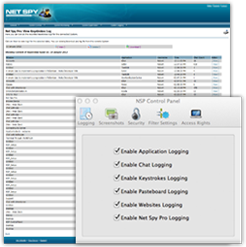
The Network Monitoring section has two different types of features. The first type is the LIVE MONITORING feature. Certain functions can be performed LIVE, to instantly "check-up" on a Mac user. The second type is LOGGED MONITORING which captures specific activities and stores it for later viewing.
Live Monitoring
Net Spy Pro Mac allows you to check-in on a Mac user in REAL TIME. This shows you the activities of your employees or students instantly. You can also watch keystrokes as they happen! These features allow you to effectively watch all users' current actions over LAN Mac network.
See below for a complete list of Net Spy Pro Mac LIVE MONITORING functions:
View Real Time Screens, Events and Keystrokes!
Net Spy Pro Mac allows the administrator to view an actual screenshot of a Mac workstation instantly! You can even watch keystrokes and events as they happen! This can be used for live surveillance to see if your network users are working or playing during working hours.
View Browser Favorites
Net Spy Pro Mac allows the administrator to view Safari Browser Favorites of a Mac system user instantly. You can see an entire day’s browsed web pages with complete URL paths listed. You can also run the URL from the given list.
View Browsers Histories
Net Spy Pro Mac allows the administrator to view Safari Browser History of the Mac system. You can see detailed browser history info with searched strings, URLs, web addresses and downloaded content. This lets you keep track of the users’ daily activities.
View Open Ports
Net Spy Pro Mac allows the administrator to view all open ports of the remote Mac system. This enables you to check whether there are any open ports listening on the other system present to avoid crashing of the system further.
5. View Active Processes, Login Items and System Info
Net Spy Pro Mac allows the administrator to see all active processes, login items and the system info of any Mac in the network. By this, you can do more than just watch over shoulders. Prevent any inappropriate process or login item to execute on the office Mac.
View Recent Documents
Net Spy Pro Mac allows the administrator to view all recent documents created on the remote Mac system in the network. This helps you to know whether the employee or student has been doing permissible jobs or not, on the system.
Logged Monitoring
Once installed, NSP Mac immediately starts recording all client Mac activities in the network. The network administrator can also later supervise with all logged details like emails, chat conversation, websites, and much more.
All Mac computers in the network can be supervised with their activities logged and viewed in the Client Web Panel. The administrator can access this information remotely on his web browser within the LAN network. Logs also contain actual screenshots of the system activity and are standard .JPG images and text files. Printable logs are also available.
See below for a list of Net Spy Pro Mac LOGGED MONITORING functions:
Screenshots Logged
Net Spy Pro Mac captures a full-size screenshot of the complete screen at a set timed interval. The entire desktop screen is recorded as a picture. This way, you can have pictures of all of their activities displayed on remote Mac systems.
Websites Logged
Net Spy Pro Mac continuously saves a log of all websites visited and online searches in the Safari browser on the client Mac. Staying invisible, it also stores a time stamp, username and the URL path for all web pages clicked on. This way, you can see how long the user has been on each website.
Chat Transcripts Logged
Net Spy Pro Mac logs every chat conversation on any Mac client system on the network. It is designed to detect and record chat conversations of both sides in popular IM clients like Yahoo!, iChat, Skype and AIM. The network administrator can view as well as download the transcripts of any Mac network system. This way, you can discover the REALITY and improve productivity.
Keystrokes Logged
Net Spy Pro Mac effectively records all keystrokes typed by the Mac users within the network. It is case-sensitive (with Ctrl, Alt, and other functional buttons like Shift). As soon as they log in, the program starts recording pre-defined keystrokes for the network supervisor to view along with appropriate time stamp and the window in which it is typed.
This way, you can also recover any lost data typed inside any application for back up purposes.
Documents Logged
Net Spy Pro Mac records all recent documents accessed in any Mac client system within the network. The network supervisor can view a complete list of all documents accessed and find out the actual work conduct of an employee. This way, you can also check whether the employee is wasting company resources for any personal use.
Applications Logged
Net Spy Pro Mac creates a list of applications that a user has executed and categorizes the results by date for easy navigation. Each application will be logged along with username, date/time executed, and the title of the application ran.
Net Spy Pro Mac is a program for all circumstances. Network administrators are provided remote access and control over any Mac system within the network. For example, if the administrator wants to lock a Mac computer, usually he would have to manually walk to it to perform commands. But with Net Spy Pro, you can save time and energy by doing this directly from your own workstation!
Administrative Tools
The smooth and intuitive interface allows you to perform vital tasks from the comfort of your own Mac. These Administrative Tools give you the ability to lock a system, send the user a message, launch a website, restart the system, log out the user and much more.
See below for a list of Net Spy Pro Mac administrative features:
System Lock
Net Spy Pro Mac can prevent unauthorized access to any system, (active/idle) when the supervisor locks it. The supervisor can also unlock it as well, whenever desired.
System Log Out, Shut Down and Restart
Net Spy Pro Mac can help the supervisor to log out, shut down and restart the Mac system within the network, remotely.
Launch Website
Open any website or Internet portal with Net Spy Pro Mac on any remote Mac system within the network. The network supervisor can help employees with any website or online info by directly opening the webpage on their system.
Launch Applications
Net Spy Pro Mac offers the network supervisor to launch any application, or file remotely on any Mac system within the network. Reduce the time loss in between and open any application on the desired system of the network.
Empty Trash
The network supervisor can delete the Trash content of any Mac system within the network. Clean Trash of any Mac directly through the admin workstation.
Display a Message to User
Net Spy Pro Mac lets the network supervisor display a message directly from their own workstation within the network. This way, the user can be informed on the remote Mac without dropping the option of stealth.
Run Screen Saver
Net Spy Pro Mac can run a screen saver on any Mac system within the network. This is one of the commonly offered control features with NSP Mac.
Undoubtedly, you will always want your employees to do what you instruct. But, if ever you find them going off track, Net Spy Pro Mac offers you Content Filtering features to censor the unpermitted activities on their Mac system. Add an extra set of hands to block any user from accessing any unacceptable websites or applications with customized configuration of settings.
Content Filtering
Net Spy Pro Mac offers you a variety of ways to block activity. You can block entire websites or just specific web pages by adding site addresses or URLs. You can block applications from running by adding an entry to the blocked application list for the current user.
See below for a complete list of Net Spy Pro Mac content filtering functions:
Web Site Blocking
Most business environments face problems of unsupervised employees, malicious Internet threats and inappropriate application execution within their network. The dilemma to supervise and block such activities is solved as Net Spy Pro Mac does its job.
The network supervisor can add all impermissible websites in the Net Spy Pro Mac Web Administration Panel Filter Settings and block them. This way, you can limit employees’ Internet usage to specific purposes identified by the supervisor.
So, the next time when the user in the network Mac tries to access a webpage or website black-listed by the supervisor, the browser gives no access to that URL.
Application Blocking
Employees, students or public users of your systems often work without following the guidelines set. It’s always a good idea to play it safe rather than risk security of your network. And, what is a better way to lay down its rules but in an efficient and friendly manner? Along with websites, specified applications can also be blocked from being executed. This could minimize employees wasting time on game and file-sharing applications, etc and also lessen any malicious virus threats.
The network supervisor can create a list of blocked applications by naming them in the Net Spy Pro Mac Web Administration Panel Filter Settings and block them from being launched.
In addition to keeping a list of web sites that can't be accessed, a network supervisor can create a list to block specific applications from being launched. The list can include application names along with their paths. If any black-listed application is clicked-on, it never launches.
Other Features
Net Spy Pro Mac has many other features. A complete list is detailed below:
Remote Control
Net Spy Pro Mac is the finest way to monitor your Mac network! This is because of the NEW ADMIN SETTINGS provided with it. The supervisor can control any Mac in the network from his own workstation. There are two ways to control and monitor the remote systems. By making one-time settings in the NSP Mac Client Admin Panel and watching over from NSP Mac Client Web Panel.
The remote control feature works easily for the network supervisor from his own system within the network. Once the supervisor logs into the panel with their password and gains access to the configuration settings of any system in the network. Later, saving the legwork, he can have full control with his presence in the remote system and monitoring all activities.
Easy to Use and Install
Net Spy Pro Mac is easy to install and understand. Focusing on convenient usage for the network supervision, it features a utility control panel with all monitoring, administrative, supervising and logging features. Once installed manually in each Mac in the network, the supervisor can customize settings to view activity or perform administration tasks, stealthily.
The deployment of Net Spy Pro Mac is the beginning of a simple and stealthy task. A Net Spy Pro Mac network supervisor simply installs the software on each of the systems and monitors his employees or students. NSP Mac keeps the traditional monitoring method in the past with a smooth, user-friendly interface to navigate through. Its dashboard neatly stacks each command within its functional category.
Free Minor Version Updates
Retina-X Studios, LLC offers users of Net Spy Pro Mac free updates until the next major version. When a new release is out, it will be free up to the next major version.
Extensive Help Section
Net Spy Pro Mac offers answers to all questions to the diverse base of customers through Net Spy Pro Mac user guide. It contains all instructions on installation, function and benefits of NSP Mac ensuring efficient service.
For more responsive and easy resolution of client issues, extensive support resources are offered such as 24/7 telephone and chat support.
Lifetime Support
We desire to cherish and commit to our clients with premium, extended and persistent support to our customers for life. Delivering the best of the benefits is our goal at Net Spy Pro Mac support with simplicity, flexibility and heightened performance. Check out our product user guides and online support common questions.